QS1E01AA0H4A3P1T
QS1E01AA0H4A3P1T
QS1E01AA0H4A3P1T
QS1E01AA0H4A3P1T
QS1E01AA0H4A3P1T
QS1E01AA0H4A3P1T
Ask our team:
  • Phone: +86 181 0690 9650
  • E-Mail sales1@apterpower.com
  • Lifecycle status

    Active / Available from OEM
    Apter Power supports exact-suffix quotation, condition verification, and SANMOTION Q documentation matching.

QS1E01AA0H4A3P1T

/ 4.9
1001 reviews | Need a Specific Revision?
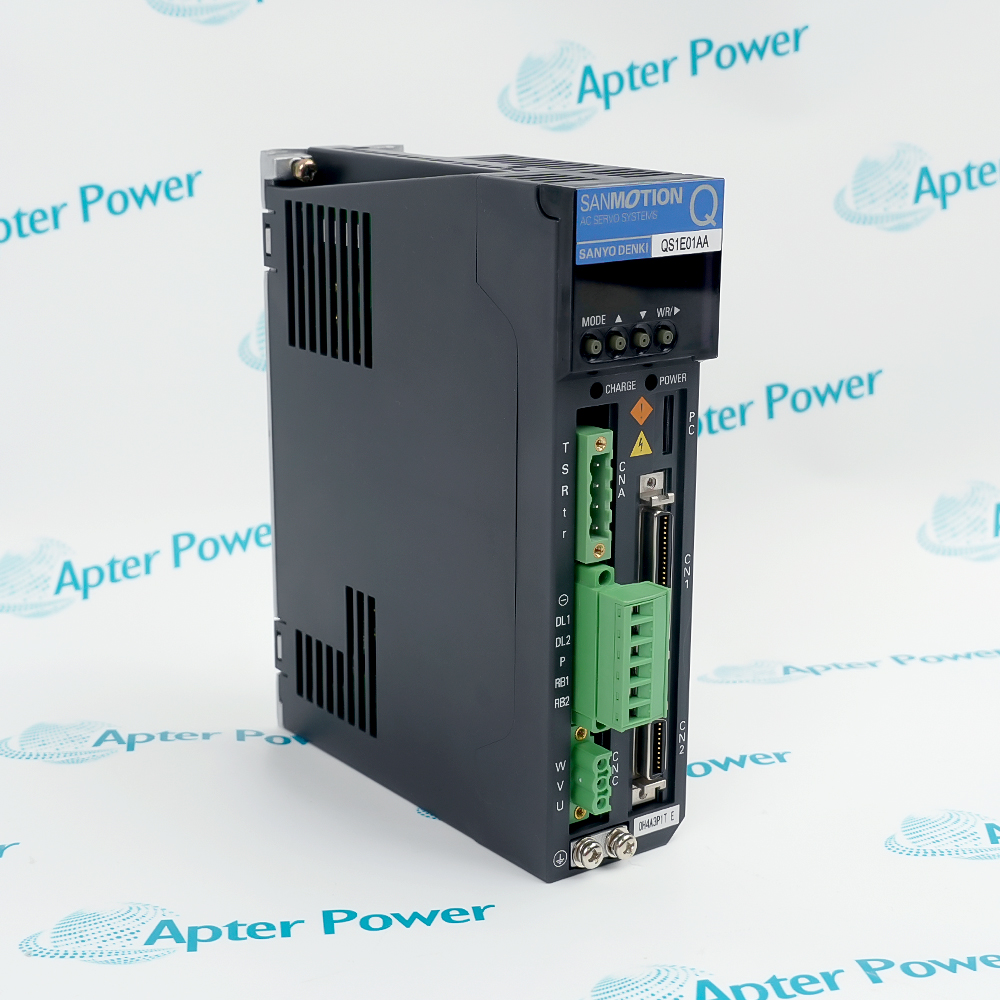
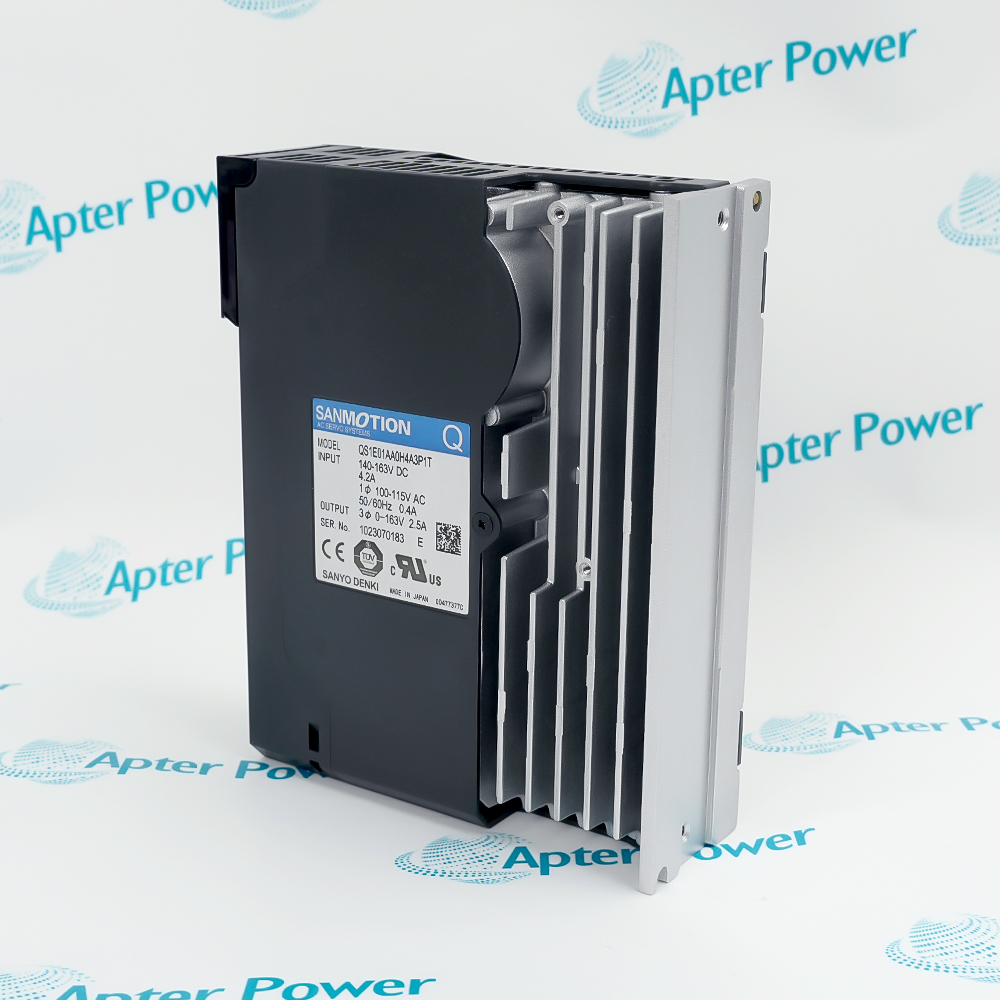
SANYO-DENKI QS1E01AA0H4A3P1T is a SANMOTION Q AC servo amplifier with dual input markings and a 0–163 V, 2.5 A three-phase output for installed motion-control axes.
In Stock
Ships by Wednesday, October 28
Fast Shipping Available
Get a quick price for QS1E01AA0H4A3P1T
Quantity
*E-mail
Company
*Mobile
*Content
Upload (gif, jpg, jpeg, png, bmp, doc, docx, xls, xlsx, ppt, pdf, csv)

Technical specifications for QS1E01AA0H4A3P1T

  • Manufacturer:
    SANYO-DENKI
  • Part Number:
    QS1E01AA0H4A3P1T
  • Product Family:
    SANYO-DENKI
  • Product Type:
    AC Servo Amplifier
  • Stock:
    1
  • Series:
    SANMOTION Q
  • DC input:
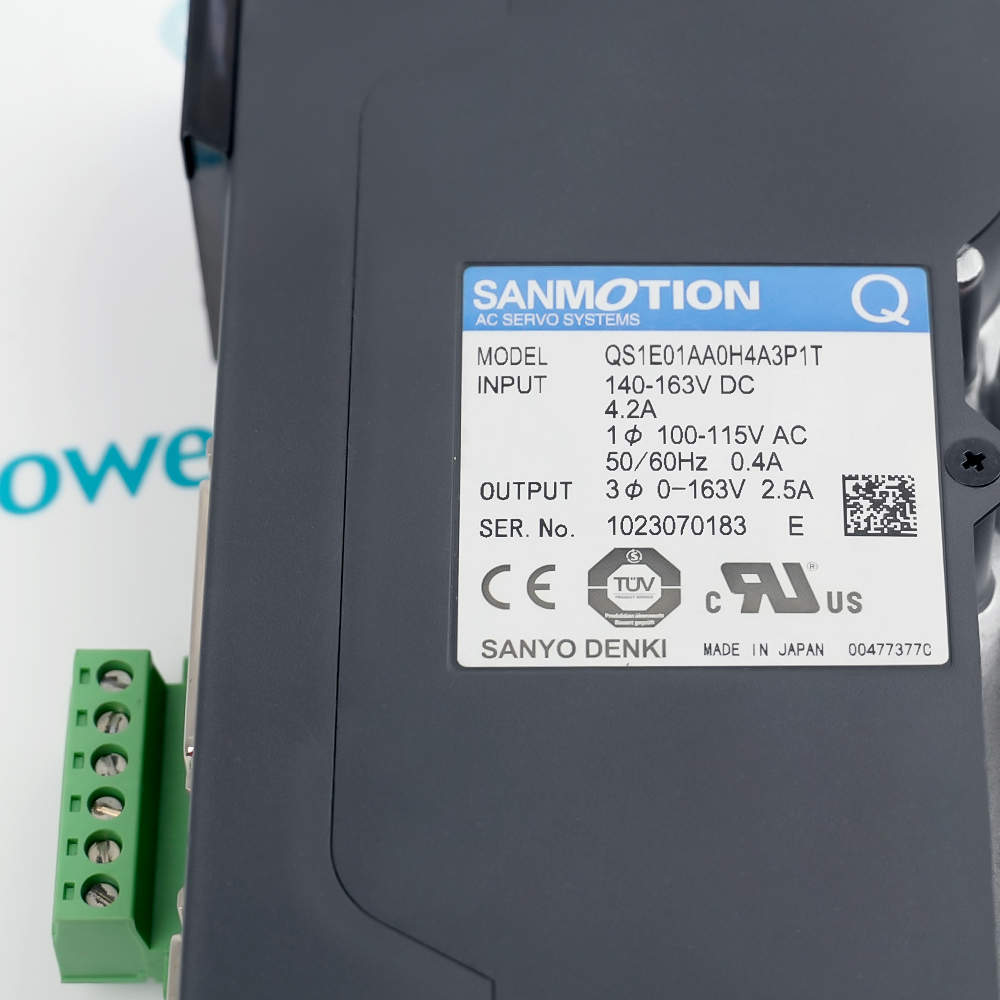
    140–163 VDC, 4.2 A
  • AC input:
    1-phase 100–115 VAC, 50/60 Hz, 0.4 A
  • Output:
    3-phase 0–163 V, 2.5 A
  • Setup software:
    SANMOTION Q Setup Software
  • Tariff Code:
    Please confirm the destination before shipping
  • Country of origin:
    Japan
  • Place of shipment:
    Xiamen,Fujian,China
By purchasing this item, you agree to the Terms & Conditions, ApterPower is not an authorized distributor for listed manufacturers or tradenames and therefore the manufacturer's warranty does not apply. All our products come with ApterPower's 1-year warranty.

More Information

Overview Manuals Power Matching Setup Functions Alarm Diagnostics Product Applications

Features:

  • Exact electrical profile: the nameplate separates its DC and single-phase AC input ratings from the three-phase axis output.
  • QS1 software route: SANMOTION Q Setup Software supports parameters, monitoring, alarm history, reset, manual operation, and tuning.
  • Cabinet-level identity: the full suffix distinguishes the installed amplifier configuration from visually similar QS1E01AA units.
The complete model identifies a SANMOTION Q amplifier whose nameplate ratings define the cabinet power and motor-side boundaries.

SANYO DENKI’s dedicated Q software provides the supported path for configuration, live status review, alarm handling, and controlled manual operation.

A sound replacement decision keeps the full suffix, existing wiring arrangement, and axis requirements together instead of treating the QS1 family prefix as sufficient.

Apter Power supports SANYO-DENKI QS1E01AA0H4A3P1T AC Servo Amplifier quotations, technical documentation, and exact-configuration review.
SANYO-DENKI QS1E01AA0H4A3P1T AC Servo Amplifier Manuals,Datasheets,LinkImportant Notice: These Apter Power resources help locate SANYO-DENKI products, servo-drive options, and technical support.
  • DC input boundary: 140–163 VDC at 4.2 A defines the documented high-power input path.
  • AC input boundary: the nameplate separately lists single-phase 100–115 VAC at 50/60 Hz and 0.4 A.
  • Axis output: the three-phase 0–163 V, 2.5 A rating sets the motor-side electrical envelope for this unit.
  • Parameter setting: SANMOTION Q Setup Software provides the manufacturer-supported configuration environment for QS1 amplifiers.
  • Manual operation: jogging and tuning functions support controlled commissioning after the installed axis is confirmed safe.
  • Configuration continuity: retaining the accepted parameter set helps keep a replacement aligned with the machine’s original motion behavior.
  • Status monitoring: live operating information provides the first diagnostic view when the axis does not respond as expected.
  • Alarm history: recorded events help distinguish a recurring condition from a one-time trip.
  • Reset function: the supported software can clear alarms after their underlying cause has been addressed.
  • Installed SANMOTION Q axes: maintains motion-control duties where this complete QS1 amplifier configuration is already documented.
  • Servo cabinet replacement: supports exact-suffix maintenance of an existing amplifier and its established power arrangement.
  • Commissioning work: uses Q-series setup, monitoring, alarm, jogging, and tuning functions during controlled axis service.
Description
QS1E01AA0H4A3P1T serves as the servo amplifier in a SANMOTION Q motion-control cabinet, converting the installed command path into a three-phase output for the connected axis. Its nameplate identifies a 0–163 V, 2.5 A output, giving engineers a specific electrical boundary for replacement planning rather than a generic QS1 family reference.

Commissioning work around QS1E01AA0H4A3P1T can use SANYO DENKI’s SANMOTION Q Setup Software for parameter setting, status monitoring, alarm history and reset, manual operation, and tuning. These functions provide one supported route from initial configuration to fault review without assuming features from later SANMOTION generations.

When QS1E01AA0H4A3P1T is being sourced for an installed machine, the complete suffix and both input markings should be matched to the cabinet’s existing power arrangement. Apter Power can help customers compare the nameplate, motor-side output requirement, and QS1 documentation before quotation while leaving unverified motor or option compatibility for engineering confirmation.
Alternative Names
SANYO DENKI QS1E01AA0H4A3P1T SANYO-DENKI QS1E01AA0H4A3P1T SANMOTION Q QS1E01AA0H4A3P1T QS1E01AA-0H4A3P1T QS1E01AA 0H4A3P1T QS1 E01 AA0 H4 A3 P1 T QS1E01AAOH4A3P1T QS1E01AA0H4A3PIT QS1E01AA0H4A3P1T Servo Amplifier
Technical notes
QS1E01AA0H4A3P1T carries two distinct input ratings: 140–163 VDC at 4.2 A and single-phase 100–115 VAC at 0.4 A. Treating the markings as interchangeable could misidentify the cabinet supply path. To protect the drive and host machine, we recommend following the installed wiring drawing when preserving the original power arrangement.
Exceptional Service

Our Mission

  • 100% Satisfaction

    We believe expertise is priceless. With over 20 years of experience, and top engineers on staff, we can help you solve or avoid problems that threaten your business.
  • Trust Guaranteed

    Not only do we have a vast inventory, our team makes sure every piece of equipment is in working condition. Your purchases are also backed by our Warranty.
  • Expertise

    Time is money, especially when your equipment is down. We work quickly to get your equipment on its way so you can get it back up and running.

FAQS

The following is a list of questions commonly asked by our customers. Please contact us if you have a question about our process that is not answered below.
Can QS1E01AA0H4A3P1T replace a QS1 amplifier that has a similar front label?
Only when the complete suffix, input and output ratings, connector arrangement, and installed axis requirements agree. A shared QS1E01AA prefix alone does not establish drop-in compatibility.
What diagnostic path is useful when QS1E01AA0H4A3P1T powers up but its machine axis will not run?
Use SANMOTION Q Setup Software to review live status and the alarm history before changing parameters. The active condition should direct the next check, while recurring alarms should be resolved before another reset.
How can SANMOTION Q Setup Software support commissioning of QS1E01AA0H4A3P1T?
It provides parameter setting, status monitoring, alarm history and reset, manual operation, and tuning functions for QS1 amplifiers. Start from the accepted machine configuration and use manual motion only under controlled commissioning conditions.
When is manual jogging appropriate for QS1E01AA0H4A3P1T during machine service?
Jogging is appropriate after the axis wiring, power arrangement, motor connection, and machine safety state are confirmed for controlled movement. Stop the test if the observed motion or alarm state differs from the service plan.
Why should the alarm history be read before resetting QS1E01AA0H4A3P1T?
The recorded event helps identify whether the stop is linked to the present operating state or a recurring condition. Resetting without addressing the cause can return the axis to the same alarm immediately.
What should accompany an RFQ for QS1E01AA0H4A3P1T when the installed amplifier cannot be removed?
Provide a clear nameplate image, front-connector view, machine wiring drawing, and the motor or axis record. These details let Apter Power compare the complete suffix and electrical profile before quotation.

Product Browsing History