Ask our team:
  • Phone: +86 181 0690 9650
  • E-Mail sales1@apterpower.com
  • Lifecycle status

    Active / Available from OEM
    Apter Power verifies the single-port catalog, Series, firmware boundary, condition, and project records before coordinating quotation.

2711P-T7C21D8S

/ 4.9
1001 reviews | Need a Specific Revision?
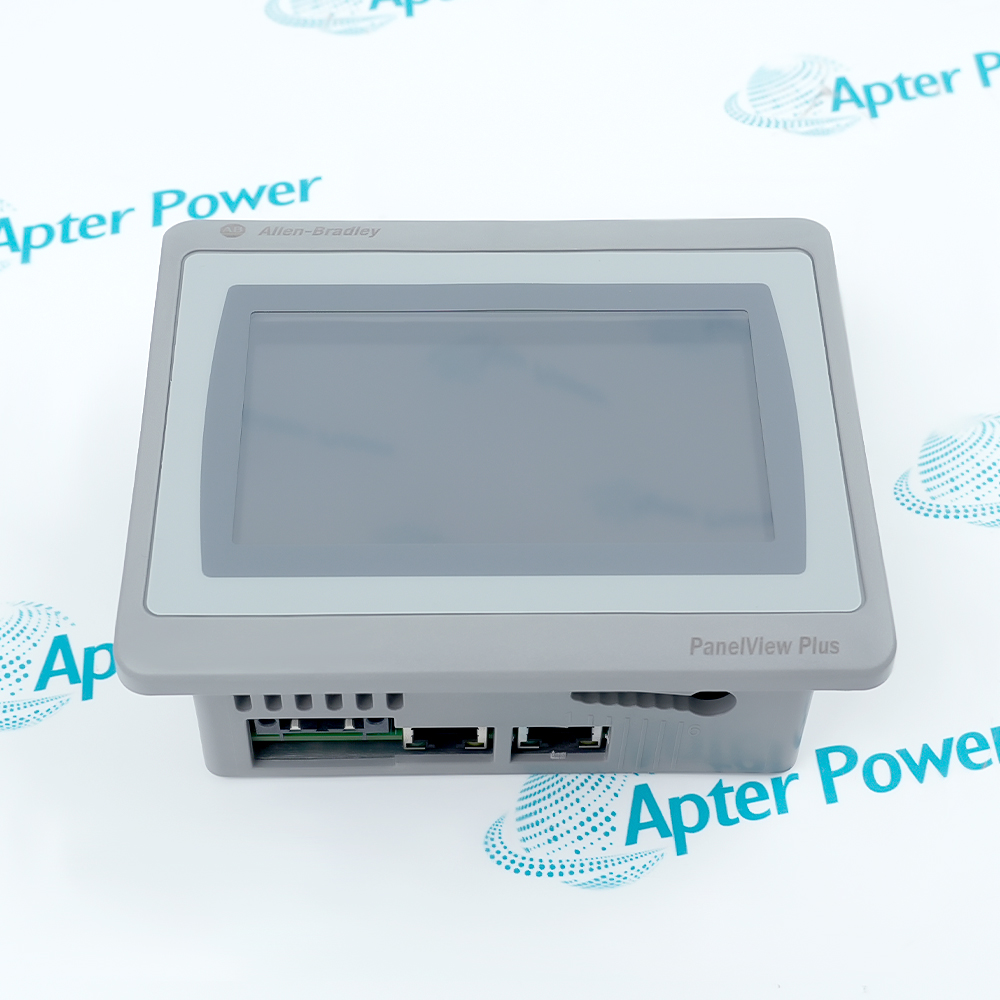
Allen-Bradley 2711P-T7C21D8S is a 6.5-inch PanelView Plus 7 Standard terminal using one Ethernet port for focused machine-level visualization and control.
In Stock
Ships by Thursday, October 29
Fast Shipping Available
Get a quick price for 2711P-T7C21D8S
Quantity
*E-mail
Company
*Mobile
*Content
Upload (gif, jpg, jpeg, png, bmp, doc, docx, xls, xlsx, ppt, pdf, csv)

Technical specifications for 2711P-T7C21D8S

  • Manufacturer:
    Allen-Bradley
  • Part Number:
    2711P-T7C21D8S
  • Product Family:
    Allen Bradley Panelviews
  • Product Type:
    Graphic Terminal
  • Stock:
    1
  • Display Size:
    6.5 in.
  • Operator Input:
    Analog resistive touch
  • Resolution:
    640 × 480 VGA
  • Aspect Ratio:
    4:3
  • Memory:
    512 MB RAM; 80 MB user storage
  • Ethernet:
    One 10/100Base-T port with IEEE 1588
  • Software:
    FactoryTalk View Studio for Machine Edition 8.0 or later
  • Input Voltage:
    24 V DC nominal (18…30 V DC)
  • Weight:
    0.85 kg
  • Estimated shipping dimensions:
    17 × 21.2 × 5.65 cm
  • Tariff Code:
    Please confirm the destination before shipping
  • Country of origin:
    Japan
  • Place of shipment:
    Xiamen,Fujian,China
By purchasing this item, you agree to the Terms & Conditions, ApterPower is not an authorized distributor for listed manufacturers or tradenames and therefore the manufacturer's warranty does not apply. All our products come with ApterPower's 1-year warranty.

More Information

Overview Manuals Single-Port Design Standard Firmware Panel Conversion Product Applications

Features:

  • 6.5-inch VGA resistive-touch operator display
  • Single 10/100Base-T Ethernet port with IEEE 1588 support
  • PanelView Plus 7 Standard Windows CE platform
Allen-Bradley 2711P-T7C21D8S is defined as much by its single Ethernet port as by its compact 6.5-inch display.

The terminal supports local machine visualization through FactoryTalk View Machine Edition while SD and USB interfaces provide controlled file-transfer options.

A dual-port network cannot be preserved with this catalog unchanged, and Series D hardware must remain on the documented 13.x-or-later firmware branch.

Apter Power can review 2711P-T7C21D8S single-port network fit, Series, and project archive before supply.
2711P-T7C21D8S Manuals, Datasheets, Links Important Notice: Other accessories, manuals, cables, calibration data, software, etc. are not included with this equipment unless listed in the above stock item description. All prices are shown in USD.
  • Connect through one 10/100Base-T Ethernet interface
  • Do not assume onboard DLR participation
  • Document the switch port and single cable path for maintenance
  • Use FactoryTalk View Studio for Machine Edition 8.0 or later
  • Apply firmware 13.x or later to Series D terminals
  • Keep the terminal Series with the runtime archive
  • Retain the 640 × 480 project canvas
  • Verify the 142 × 184 mm panel cutout
  • Test resistive-touch calibration and overlay condition
  • Review network architecture before replacing a dual-port terminal
  • Provide local visualization for compact machines
  • Operate supported Logix-based equipment through a single Ethernet path
  • Replace documented PanelView Plus 7 Standard installations that do not require DLR
Description
The catalog suffix identifies a specific network boundary: Allen-Bradley 2711P-T7C21D8S is a 6.5-inch PanelView Plus 7 Standard terminal with one 10/100Base-T Ethernet port, not the dual-port DLR configuration.

With a 640 × 480 VGA resistive-touch display, Allen-Bradley 2711P-T7C21D8S provides a focused machine interface for FactoryTalk View Machine Edition applications. Windows CE supplies the documented platform services, while local SD and USB interfaces support application-file handling.

Network architecture is the decisive selection point for Allen-Bradley 2711P-T7C21D8S. A project that needs DLR or two physical Ethernet paths requires a different catalog configuration; Series D also requires version 13.x firmware or later according to Rockwell documentation.
Revisions

Revision Part #

Also known as

2711P-T7C21D8S Ser A
2711P-T7C21D8S/A, Series A, Rev A
2711P-T7C21D8S Ser D
2711P-T7C21D8S/D, Series D, Rev D
Alternative Names
Allen-Bradley 2711P-T7C21D8S terminal 2711P T7C21D8S 2711PT7C21D8S PanelView Plus 7 Standard 6.5-inch HMI AB single-Ethernet PanelView terminal
Technical notes
Allen-Bradley 2711P-T7C21D8S has one Ethernet port, so it cannot replace a dual-port DLR terminal without changing the network architecture. For Series D hardware, use firmware version 13.x or later; preserve the FactoryTalk View project, communication shortcuts, IP settings, terminal security, and cutout records before exchange.
Exceptional Service

Our Mission

  • 100% Satisfaction

    We believe expertise is priceless. With over 20 years of experience, and top engineers on staff, we can help you solve or avoid problems that threaten your business.
  • Trust Guaranteed

    Not only do we have a vast inventory, our team makes sure every piece of equipment is in working condition. Your purchases are also backed by our Warranty.
  • Expertise

    Time is money, especially when your equipment is down. We work quickly to get your equipment on its way so you can get it back up and running.

FAQS

The following is a list of questions commonly asked by our customers. Please contact us if you have a question about our process that is not answered below.
Can 2711P-T7C21D8S be inserted directly into a DLR ring?
No. Its catalog code specifies one Ethernet port; a DLR design requires a supported dual-port terminal or separate network architecture.
Which firmware boundary applies to 2711P-T7C21D8S Series D?
Rockwell states that PanelView Plus 7 Standard Series D terminals are compatible with firmware version 13.x and later.
How should 2711P-T7C21D8S Ethernet faults be isolated?
Check the single cable path, link state, IP settings, controller shortcut, switch port, and application communication status because there is no second onboard path.
What should be preserved before 2711P-T7C21D8S application recovery?
Archive the FactoryTalk View project and runtime file together with terminal Series, firmware, IP configuration, security settings, and SD-card contents.
How can 2711P-T7C21D8S touch performance be accepted after mounting?
Clean and calibrate the resistive screen, then test corner targets, navigation, alarm acknowledgement, and repeated input with the final overlay fitted.
Which selection error is common with 2711P-T7C21D8S?
Confusing the 21 single-port catalog code with a 22 dual-port model can create an unexpected network redesign during replacement.

Product Browsing History