Ask our team:
  • Phone: +86 181 0690 9650
  • E-Mail sales1@apterpower.com
  • Lifecycle status

    Active / Available from OEM
    Apter Power reviews IIMSM01 station scope, settings and condition before supply.

IIMSM01

/ 4.9
1001 reviews | Need a Specific Revision?
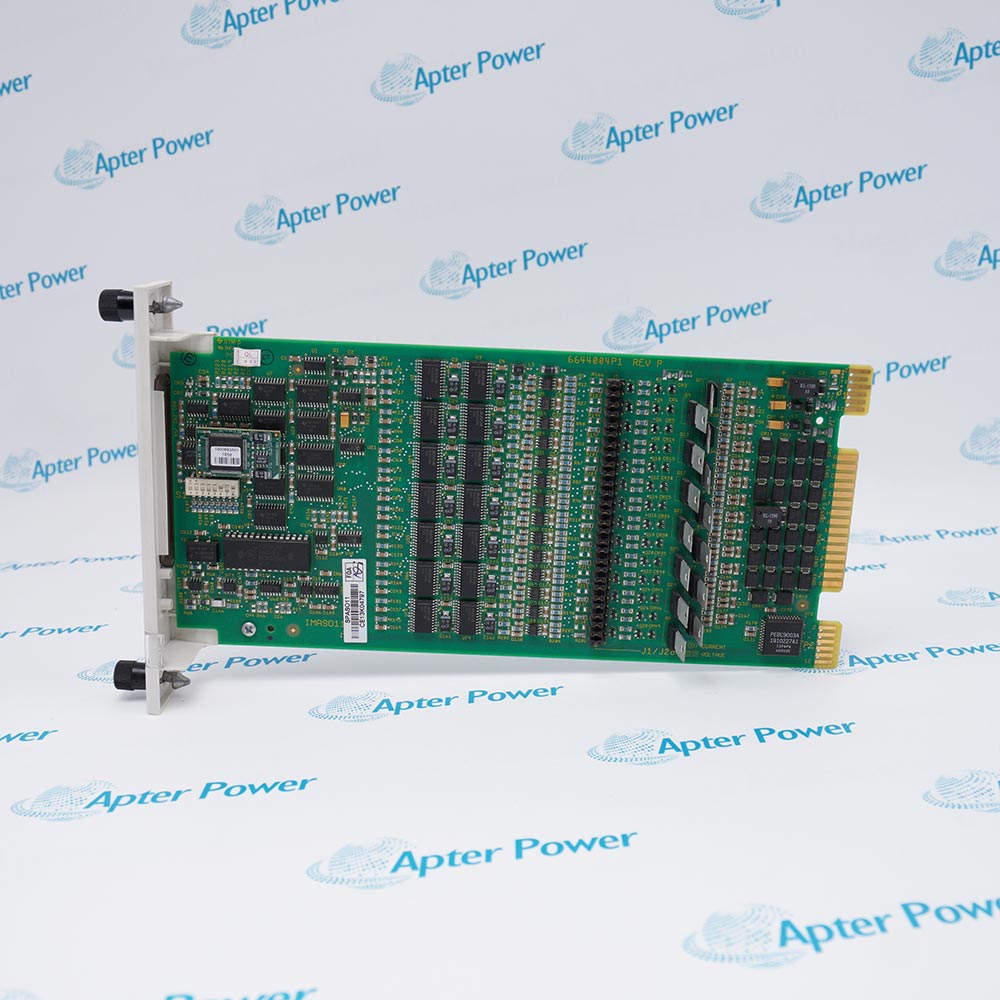
ABB Bailey IIMSM01 is a Multibus Serial Interface Module that connects an operator interface station to keyboards, printers and a diagnostic terminal.
In Stock
Ships by Wednesday, October 28
Fast Shipping Available
Get a quick price for IIMSM01
Quantity
*E-mail
Company
*Mobile
*Content
Upload (gif, jpg, jpeg, png, bmp, doc, docx, xls, xlsx, ppt, pdf, csv)

Technical specifications for IIMSM01

  • Manufacturer:
    ABB
  • Part Number:
    IIMSM01
  • Product Family:
    ABB Bailey
  • Product Type:
    Multibus Serial Interface Module
  • Stock:
    1
  • Module Name:
    Multibus Serial Interface Module
  • Station Families:
    OIS20, OIS25 and MCS
  • Port 1:
    Keyboard 1
  • Port 2:
    Keyboard 2
  • Port 4:
    Auxiliary / not used
  • Port 5:
    Printer 1
  • Port 7:
    Printer 2
  • Port 8:
    Diagnostic terminal
  • Configuration:
    Jumpers and DIP switches
  • RAM Selection:
    16K or 64K
  • Weight:
    0.32 kg
  • Estimated shipping dimensions:
    30.5x17.5x1.5cm
  • Tariff Code:
    Please confirm the destination before shipping
  • Country of origin:
    Sweden
  • Place of shipment:
    Xiamen,Fujian,China
By purchasing this item, you agree to the Terms & Conditions, ApterPower is not an authorized distributor for listed manufacturers or tradenames and therefore the manufacturer's warranty does not apply. All our products come with ApterPower's 1-year warranty.

More Information

Overview Manuals Serial Port Roles Hardware Setup Station Recovery Product Applications

Features:

  • Defined serial roles: The module assigns operator-station peripherals to numbered ports.
  • Hardware configuration: Jumpers and DIP switches retain the installed communication setup.
  • OIS integration: The board supports documented OIS20, OIS25 and MCS station arrangements.
The module is identified by its Multibus position and peripheral interface role rather than by a generic serial-board description.

Each port has a documented purpose, allowing keyboard, printer and diagnostic paths to be traced separately during service.

A successful exchange preserves switch settings, memory selection and cable-to-port mapping before the station is restarted.

Apter Power can support procurement for the ABB Bailey IIMSM01 Multibus Serial Interface Module after operator-station type, port map and hardware settings are documented.
ABB IIMSM01 Multibus Serial Interface Module Manuals,Datasheets,Link
Important Notice: No qualified exact-model English PDF is attached. Use the complete product model in every document request.
  • Keyboard paths: Ports 1 and 2 serve the two documented keyboard connections.
  • Printer paths: Ports 5 and 7 are assigned to the first and second printers.
  • Diagnostic access: Port 8 provides the documented diagnostic-terminal connection.
  • Reserved position: Treat port 4 according to the station documentation rather than as a spare universal port.
  • Switch record: Capture every DIP-switch position before removing the operating module.
  • Jumper identity: Preserve installed jumper placement instead of assuming factory defaults.
  • RAM selection: Match the documented 16K or 64K memory setting for the station.
  • One-change discipline: Restore the original setup before diagnosing any new peripheral fault.
  • Cable labels: Mark each keyboard, printer and diagnostic lead by port before disconnection.
  • Sequential test: Prove operator input first, then printers and diagnostic access as separate paths.
  • Station context: Apply the module only within the documented OIS20, OIS25 or MCS arrangement.
  • Configuration backup: Retain the accepted hardware setup in the maintenance record for future exchange.
  • Operator keyboards: Interfaces the primary and secondary keyboard paths for the operator station.
  • Event printing: Connects the station to its documented printer channels.
  • Service terminals: Provides the assigned diagnostic-terminal interface.
  • Legacy OIS maintenance: Restores serial peripheral communication in supported Bailey station arrangements.
Description
Peripheral communication for a Bailey operator interface station is the central task of IIMSM01, whose serial ports serve defined keyboard, printer and service-terminal connections.

The internal jumpers and DIP switches of IIMSM01 establish interface behavior and memory selection, so an exchange must preserve the installed module setup rather than copying cable positions alone.

Used with documented OIS20, OIS25 and MCS arrangements, IIMSM01 gives maintenance teams a controlled bridge between the Multibus station and its external operator peripherals.
Alternative Names
IIMSM-01 Bailey IIMSM01
Technical notes
IIMSM01 assigns different peripherals to specific serial ports, including keyboards, printers and the diagnostic terminal. Moving a cable to a convenient unused connector can produce a silent interface failure even when the module powers normally. Record the original port assignment and switch settings before removal, then restore them exactly.
Exceptional Service

Our Mission

  • 100% Satisfaction

    We believe expertise is priceless. With over 20 years of experience, and top engineers on staff, we can help you solve or avoid problems that threaten your business.
  • Trust Guaranteed

    Not only do we have a vast inventory, our team makes sure every piece of equipment is in working condition. Your purchases are also backed by our Warranty.
  • Expertise

    Time is money, especially when your equipment is down. We work quickly to get your equipment on its way so you can get it back up and running.

FAQS

The following is a list of questions commonly asked by our customers. Please contact us if you have a question about our process that is not answered below.
A keyboard is connected to port 5 after IIMSM01 replacement. Should the station configuration be changed to match?
No. Port 5 is assigned to Printer 1; move the cable back to the documented keyboard port and restore the original mapping.
Both printers fail after IIMSM01 is exchanged, but the keyboards work. Where should diagnosis begin?
Inspect the port 5 and port 7 cable mapping plus their common module configuration before disturbing the working keyboard paths.
Can IIMSM01 switch settings be copied from another OIS cabinet?
Not safely by cabinet similarity alone. Preserve the original station settings because jumpers, DIP switches and RAM selection define the installed configuration.
The diagnostic terminal is silent on IIMSM01 while normal operator input remains available. Which path should be isolated?
Focus on port 8 and its terminal settings; working keyboard paths do not prove the diagnostic connection is correct.
A spare IIMSM01 is set for 16K RAM while the removed board used 64K. May the station be started?
No. Match the documented RAM selection and the rest of the hardware configuration before power is returned.
What should maintenance record before removing IIMSM01 from an OIS20 station?
Record the module position, every serial cable assignment, all jumper and DIP-switch states, and the RAM selection before disconnection.