IC752SPL013
IC752SPL013
IC752SPL013
IC752SPL013
IC752SPL013
IC752SPL013
Ask our team:
  • Phone: +86 181 0690 9650
  • E-Mail info@apterpower.com
  • Lifecycle status

    Active / Available from OEM
    Apter Power supports IC752SPL013 identification, quotation, and procurement planning for EX2100 maintenance requirements.

IC752SPL013

/ 4.9
1001 reviews | Need a Specific Revision?
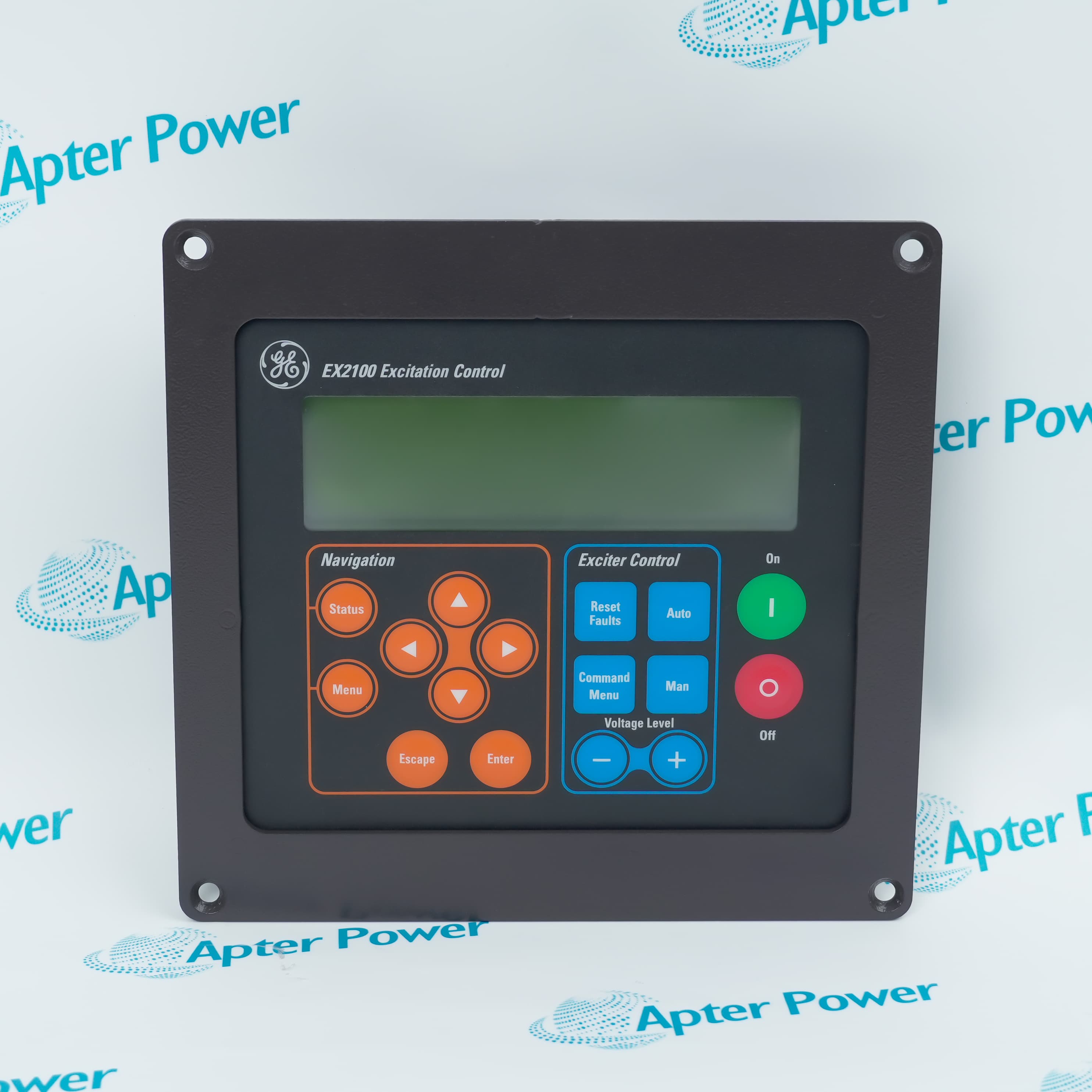
A photographed General Electric EX2100 excitation-control operator-panel assembly offered under IC752SPL013 has separated navigation, excitation-control, voltage-level and unit command areas.
In Stock
Ships by Tuesday, September 29
Fast Shipping Available
Get a quick price for IC752SPL013
Quantity
*E-mail
Company
*Mobile
*Content
Upload (gif, jpg, jpeg, png, bmp, doc, docx, xls, xlsx, ppt, pdf, csv)

Technical specifications for IC752SPL013

  • Manufacturer:
    General Electric
  • Part Number:
    IC752SPL013
  • Product Family:
    GE Excitation Control
  • Product Type:
    Excitation Control Operator Panel
  • Stock:
    1
  • Observed Front Family Marking:
    EX2100 Excitation Control
  • Observed Display Arrangement:
    Window above the grouped operator keys
  • Observed Navigation Labels:
    Status; Menu; arrow keys; Escape; Enter
  • Observed Exciter Control Labels:
    Reset Faults; Auto; Command Menu; Man
  • Observed Voltage Level Labels:
    Minus; Plus
  • Observed Unit Labels:
    On; Off
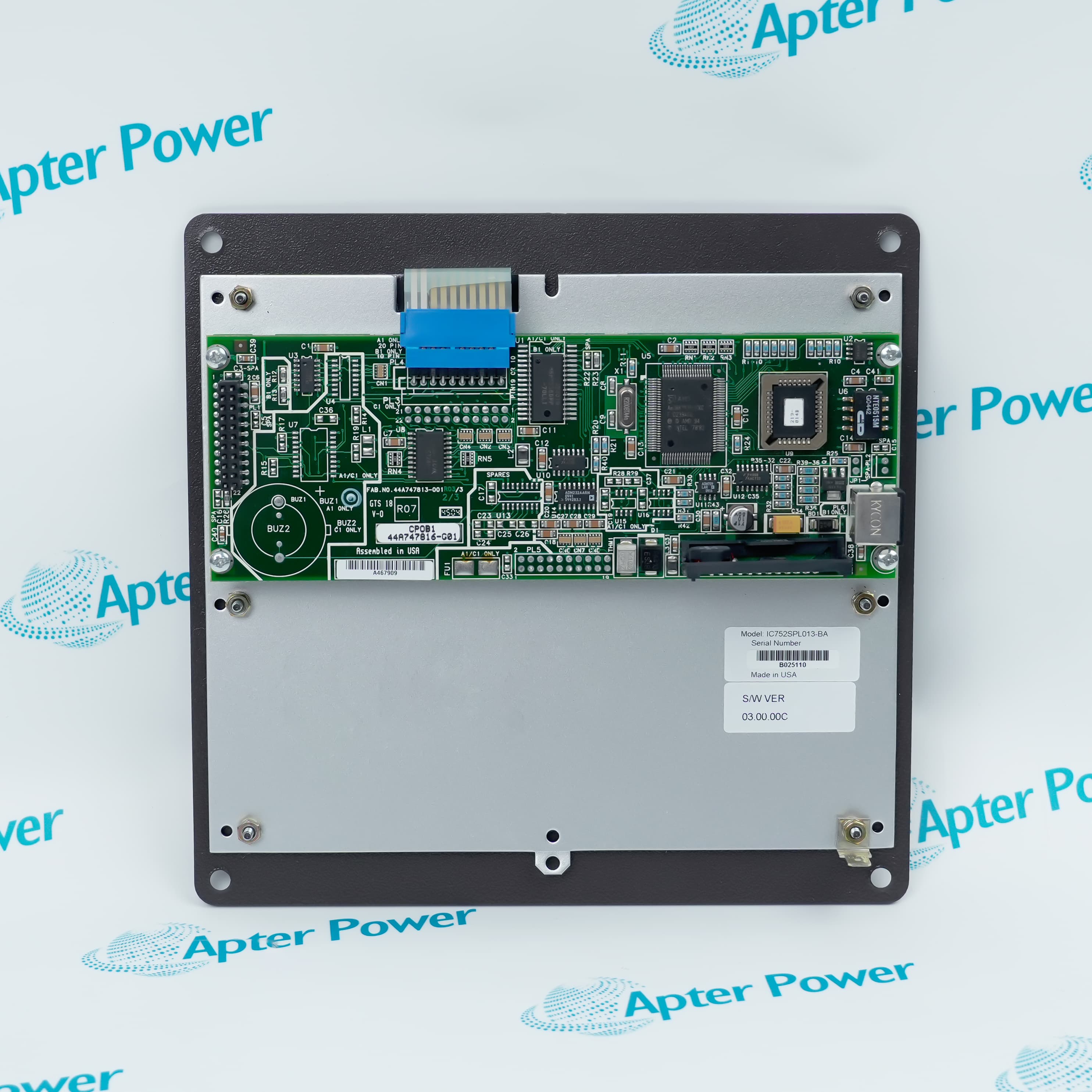
  • Observed Rear Format:
    Circuit-board assembly with metal backing plate
  • Tariff Code:
    Please confirm the destination before shipping
  • Country of origin:
    USA
  • Place of shipment:
    Xiamen,Fujian,China
By purchasing this item, you agree to the Terms & Conditions, ApterPower is not an authorized distributor for listed manufacturers or tradenames and therefore the manufacturer's warranty does not apply. All our products come with ApterPower's 1-year warranty.

More Information

Overview Manuals Physical Format Identity Markings EX2100 Context Product Applications

Features:

  • Photographed GE EX2100 Excitation Control face
  • Four labelled operator-control areas on the shown assembly
  • Front and rear views for stock-unit identification
The photographed stock unit offered under IC752SPL013 carries General Electric and EX2100 Excitation Control markings as its quickest front-side references.

On the shown face, Navigation, Exciter Control, Voltage Level and Unit areas sit beneath and beside the display window, helping technicians distinguish the panel layout during cabinet inspection.

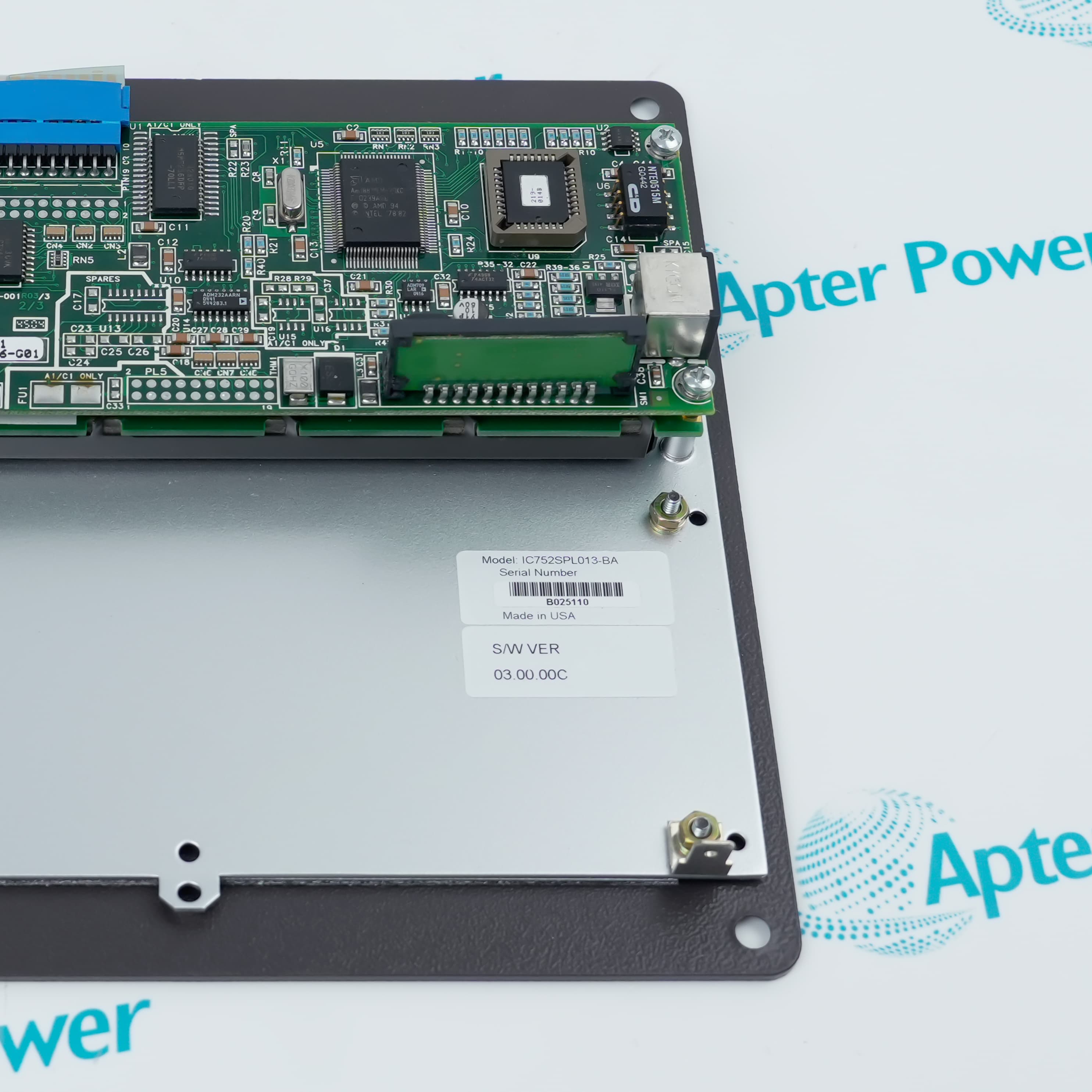
The supplied rear views expose the circuit-board assembly, metal backing plate and mounting points, helping buyers define the visible stock-unit scope before quotation.

For General Electric IC752SPL013 Excitation Control Operator Panel documentation, quotation, and procurement support, contact Apter Power.
General Electric IC752SPL013 Excitation Control Operator Panel Manuals,Datasheets,Link
Important Notice: Other accessories, manuals, cables, calibration data, software, etc. are not included with this equipment unless listed in the above stock item description. All prices are shown in USD.
  • Shown front structure: The photographed stock unit has a rectangular faceplate carrying the display window and grouped operator keys.
  • Shown rear electronics: The supplied rear view exposes the photographed unit's circuit-board assembly behind the panel face.
  • Shown backing plate: A metal backing plate supports the photographed rear assembly.
  • Shown mounting points: Faceplate corner holes and rear fasteners provide attachment references on the photographed stock unit.
  • Shown manufacturer mark: The front photograph carries the GE emblem on the operator face.
  • Shown family mark: EX2100 Excitation Control appears above the display window on the photographed stock unit.
  • Shown rear item label: A manufacturer label on the rear backing plate provides the complete supplied-unit identifier.
  • Shown software label: A separate S/W VER field is visible beside the photographed rear item label and remains unit-specific.
  • Generator-control family: GE Vernova includes EX2100 among the Generator Controls families in its parts-management portfolio.
  • Adjacent families: EX2000, EX2100 and EX2100e are listed separately in that portfolio.
  • Panel context: The IC752SPL013 product photographs carry the EX2100 Excitation Control face marking.
  • Selection boundary: The system-level listing does not make EX2100 and EX2100e panels interchangeable.
  • Screen-navigation interface: On the photographed stock unit, Status, Menu, directional, Escape and Enter markings identify the local navigation area.
  • Excitation-control interface: On the photographed stock unit, Auto, Man, Reset Faults and Command Menu mark local operator-input positions.
  • Voltage-level interface: On the photographed stock unit, minus and plus mark the local voltage-level input positions.
  • Unit-command interface: On the photographed stock unit, On and Off mark the visible local unit-command positions.
Description
The photographed stock unit offered under IC752SPL013 carries a GE EX2100 Excitation Control face arranged around four clearly labelled control areas. Their separation helps maintenance and operating teams identify the shown panel layout during cabinet inspection and quotation preparation.

For IC752SPL013 quotation work, the supplied front and rear photographs show the operator face, rear electronics, metal backing plate and mounting points. This two-sided record defines the visible stock-unit scope without extending the photographs into undocumented connector, software or interchangeability claims.
Alternative Names
GE IC752SPL013 General Electric IC752SPL013
Technical notes
On the photographed stock unit offered under IC752SPL013, Auto, Man, Reset Faults, voltage-level and On/Off labels identify operator-control positions only. They do not establish electrical permissives, interlocks or the controlled circuit, so service should stop unless the installed EX2100 drawings or operating procedure define the command path.
Exceptional Service

Our Mission

  • 100% Satisfaction

    We believe expertise is priceless. With over 20 years of experience, and top engineers on staff, we can help you solve or avoid problems that threaten your business.
  • Trust Guaranteed

    Not only do we have a vast inventory, our team makes sure every piece of equipment is in working condition. Your purchases are also backed by our Warranty.
  • Expertise

    Time is money, especially when your equipment is down. We work quickly to get your equipment on its way so you can get it back up and running.

FAQS

The following is a list of questions commonly asked by our customers. Please contact us if you have a question about our process that is not answered below.
What should a buyer match before ordering IC752SPL013?
Match the GE and EX2100 Excitation Control front markings and compare the front and rear physical layout with the installed panel. Stop the order if the installed nameplate, backing plate or mounting arrangement differs.
Does IC752SPL013 belong to the EX2100 or EX2100e context?
Treat the photographed stock unit as EX2100 context, not EX2100e context, because its face is marked EX2100 Excitation Control and GE Vernova lists the families separately. Do not substitute across those families without an exact GE mapping.
What physical hardware should an IC752SPL013 quotation describe?
The photographed assembly includes the front operator panel, rear circuit-board assembly, metal backing plate and visible fasteners. State whether the quotation covers the complete observed assembly or a narrower component so the supply scope is unambiguous.
Can IC752SPL013 be selected from its front appearance alone?
No. On the photographed stock unit, the GE and EX2100 face identifies the system context, but the rear label and rear assembly remain part of the match. A front-only comparison cannot resolve a different suffix or backing arrangement.
How should a buyer handle a suffix shown on the rear label of an IC752SPL013 unit?
Treat the suffix as part of that supplied unit's identity, not as proof of a revision or substitute relationship. Hold acceptance until the purchase record and installed-equipment record link the complete rear label to the required configuration.
Is the display window on IC752SPL013 evidence of touchscreen operation?
No. The photographed face also shows dedicated physical Navigation and Exciter Control keys, while the photographs do not establish a touch layer. Specify touch operation only when an applicable GE instruction identifies it.
How should the photographed S/W VER label be used when matching IC752SPL013?
S/W VER 03.00.00C is a marking on the photographed unit, not a universal software requirement for every panel using this core model. Record the installed panel's own label and stop the match when the configuration relationship is unavailable.

Product Browsing History