Ask our team:
  • Phone: +86 181 0690 9650
  • E-Mail sales1@apterpower.com
  • Lifecycle status

    Active / Available from OEM
    Apter Power can assist with HORNER HE800WCM802 quotes, official documentation, procurement support and system-matching guidance.

HE800WCM802

/ 4.9
1001 reviews | Need a Specific Revision?
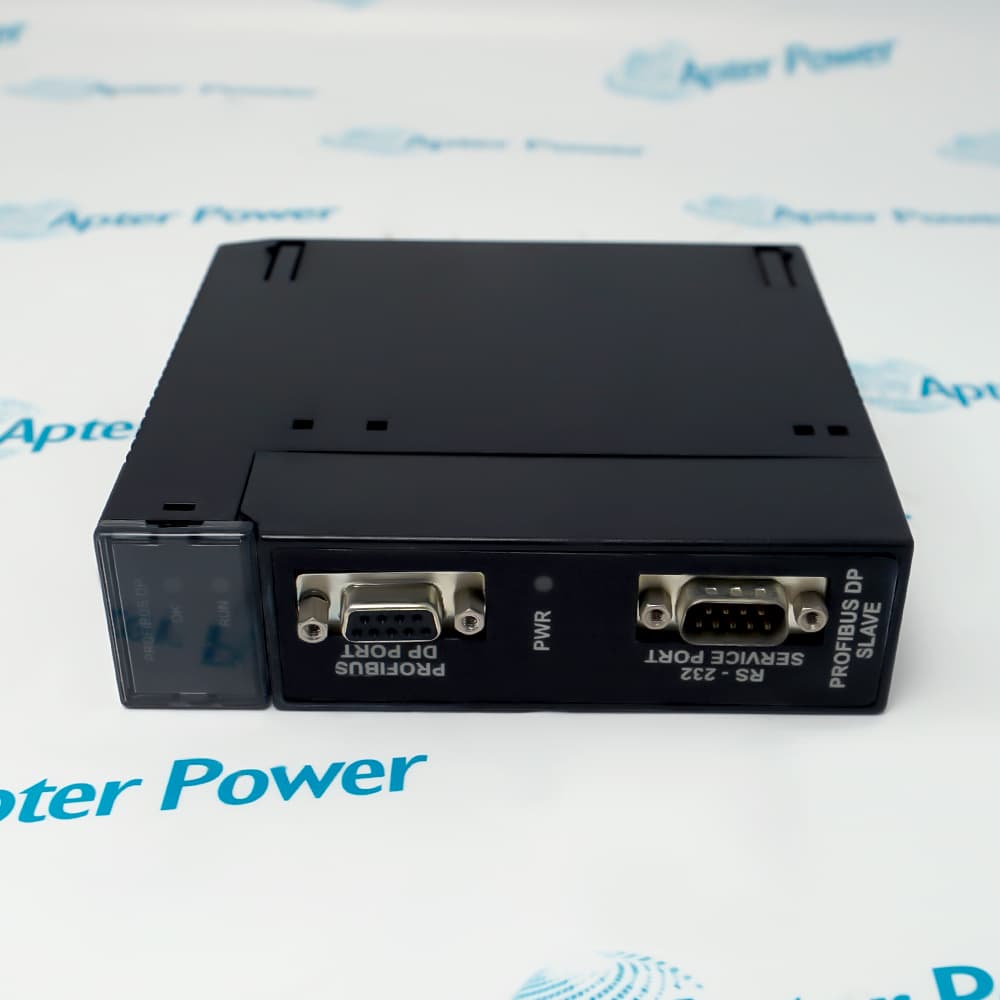
HORNER HE800WCM802 is a 2.4 GHz SmartStack wireless communications module that carries asynchronous serial data from an OCS/RCS RS-232 port over a frequency-hopping link.
In Stock
Ships by Friday, October 30
Fast Shipping Available
Get a quick price for HE800WCM802
Quantity
*E-mail
Company
*Mobile
*Content
Upload (gif, jpg, jpeg, png, bmp, doc, docx, xls, xlsx, ppt, pdf, csv)

Technical specifications for HE800WCM802

  • Manufacturer:
    HORNER
  • Part Number:
    HE800WCM802
  • Product Family:
    HORNER
  • Product Type:
    Wireless Communications Module
  • Stock:
    1
  • Frequency Range:
    2.4000-2.4835 GHz
  • Spread Spectrum:
    Frequency hopping, wide band FM modulator
  • Interface Data Rate:
    1200-57600 bps, software selectable
  • Throughput Data Rate:
    9600 bps
  • Transmit Power Output:
    50 mW (17 dBm)
  • Receiver Sensitivity:
    -105 dBm
  • Network Topology:
    Peer-to-peer; point-to-point; point-to-multipoint; multidrop
  • Operating Temperature:
    0 to 60 °C
  • Weight:
    0.441 lbs (0.2 kg)
  • Tariff Code:
    8517623400
  • Country of origin:
    USA
  • Place of shipment:
    Xiamen,Fujian,China
By purchasing this item, you agree to the Terms & Conditions, ApterPower is not an authorized distributor for listed manufacturers or tradenames and therefore the manufacturer's warranty does not apply. All our products come with ApterPower's 1-year warranty.

More Information

Overview Manuals Serial Connections Configuration Installation & Safety Applications

Features:

  • Metal-case SmartStack module for OCS/RCS wireless serial communication.
  • Frequency-hopping operation across the 2.4000-2.4835 GHz band.
  • Software-selectable 1200-57600 bps serial interface with 9600 bps rated throughput.
The HORNER HE800WCM802 Wireless Communications Module is the 2.4 GHz configuration with a metal enclosure and RPSMA antenna connection.

Its wireless link can connect compatible controller nodes without a continuous serial cable run between locations.

Before installation, confirm the OCS/RCS model, serial settings, antenna placement and Revision B or later for OCS250 use.

Apter Power assists with pricing and access to official manufacturer documentation for HORNER HE800WCM802 Wireless Communications Module.
HORNER HE800WCM802 Wireless Communications Module Manuals, Datasheets, Links Important Notice: Other accessories, manuals, cables, calibration data, software, etc. are not included with this equipment unless listed in the above stock item description. All prices are shown in USD.

Controller and PC Cabling

  • Controller Connection: Use an external null-modem cable between the module RS-232 port and the OCS/RCS serial port because the SmartStack backplane does not carry this data.
  • PC Connection: When using a PC, mount HORNER HE800WCM802 on a FOX104 base for power and connect the PC COM port to the module with a standard RS-232 cable.
  • Wiring Selection: Follow the DB-9 or DB-25 wiring diagram in the manual that matches the connected PC or controller port.

RadioSet and Cscape Setup

  • RadioSet Setup: Use the supplied RadioSet software to establish the communication parameters before placing the wireless link into service.
  • Model Selection: Select X24-009 from the Modem Model Number menu when configuring HORNER HE800WCM802.
  • Cscape Integration: Add the module to the OCS/RCS/FOX I/O stack through Cscape and follow the preliminary SmartStack procedure in the applicable controller hardware manual.

Module Installation Sequence

  • Power Isolation: Remove power from the controller, CAN port and connected peripheral equipment before adding or replacing the module.
  • Grounding Sequence: Connect the protective earth ground before making other electrical connections and never work on energized circuits.
  • Panel Preparation: Check the controller manual for panel layout and minimum clearance requirements, allowing sufficient space for the selected antenna arrangement.

Wireless Serial Connection Examples

  • Controller-to-Controller Link: Serial data from one OCS/RCS port can pass through a transmitting WCM and be delivered by the receiving WCM to another controller.
  • PC-to-Controller Link: A PC can send RS-232 data to a FOX104-mounted WCM for wireless delivery to a receiving controller station.
  • Remote Antenna Arrangement: Use an antenna kit when the antenna must be positioned away from the module or mounted outside the enclosure.
Description
HORNER HE800WCM802 is a metal-case SmartStack wireless communications module that carries asynchronous serial data from an OCS/RCS RS-232 port across a 2.4000-2.4835 GHz frequency-hopping link, making it practical where installing a direct serial cable is difficult.

With 50 mW (17 dBm) transmit output and -105 dBm receiver sensitivity, the module supports peer-to-peer, point-to-point, point-to-multipoint and multidrop layouts. Its interface rate is selectable from 1200 to 57600 bps, while rated wireless throughput is 9600 bps, so serial traffic should be matched to the RF link capacity.

Installation uses one SmartStack I/O slot plus an external RS-232 cable because communications do not pass through the controller backplane. OCS250 systems require Revision B or later; the supplied articulating antenna is intended for indoor use, while outdoor or remote mounting requires a suitable antenna kit.
Alternative Names
HE800-WCM802 HE800 WCM802 HE 800 WCM 802 HORNER HE800WCM802 Horner APG HE800WCM802 Horner SmartStack WCM802 Horner WCM802 Wireless Module
Technical notes
HORNER HE800WCM802 is a 2.4 GHz SmartStack wireless communications module with RS-232 interfacing, 50 mW transmit power and 9600 bps throughput. Use Revision B or later with OCS250 and provide an external RS-232 connection.
Exceptional Service

Our Mission

  • 100% Satisfaction

    We believe expertise is priceless. With over 20 years of experience, and top engineers on staff, we can help you solve or avoid problems that threaten your business.
  • Trust Guaranteed

    Not only do we have a vast inventory, our team makes sure every piece of equipment is in working condition. Your purchases are also backed by our Warranty.
  • Expertise

    Time is money, especially when your equipment is down. We work quickly to get your equipment on its way so you can get it back up and running.

FAQS

The following is a list of questions commonly asked by our customers. Please contact us if you have a question about our process that is not answered below.
Why does HORNER HE800WCM802 power on but no serial data reaches the controller?
HORNER HE800WCM802 does not move serial data through the SmartStack backplane. Connect the OCS/RCS RS-232 port to HORNER HE800WCM802 with the specified external cable, then verify TX/RX wiring and matching port settings.
Why cannot HORNER HE800WCM802 link with HE800WCM900 or another radio?
HORNER HE800WCM802 is a 2.4 GHz WCM802 radio and cannot communicate with the 900 MHz WCM900 family. Pair HORNER HE800WCM802 only with a compatible WCM802 unit and match the hopping channel, network address and serial settings.
How can unstable range or dropped wireless packets be reduced on HORNER HE800WCM802?
For HORNER HE800WCM802, check antenna orientation, connector condition, obstructions and line of sight before changing radio settings. Use a suitable approved antenna and keep RF extension cabling as short as practical.
Why is HORNER HE800WCM802 not recognized in an OCS250 installation?
HORNER HE800WCM802 must be Revision B or later for OCS250 use. Configure HORNER HE800WCM802 in Cscape as part of the OCS/RCS/FOX I/O stack and confirm that one of the four SmartStack slots is available.
How can serial-buffer overflow and lost data be avoided with HORNER HE800WCM802?
When HORNER HE800WCM802 receives serial data faster than the fixed RF link can transmit it, the input buffer can fill. Use messages smaller than the buffer, lower the serial interface rate or apply the documented hardware or software flow control.
What must be changed before installing HORNER HE800WCM802 outdoors?
The articulating antenna supplied with HORNER HE800WCM802 is not suitable for outdoor mounting. Use an appropriate weatherproof antenna kit, verify antenna and cable requirements for the site, and keep the RF cable as short as possible.

Product Browsing History