Ask our team:
  • Phone: +86 181 0690 9650
  • E-Mail sales1@apterpower.com
  • Lifecycle status

    Discontinued / Obsolete by OEM
    Contact Apter Power for 6AV6646-1AB22-0AX0 quotations, manuals, and SIMATIC ITC system matching.

6AV6646-1AB22-0AX0

/ 4.9
1001 reviews | Need a Specific Revision?
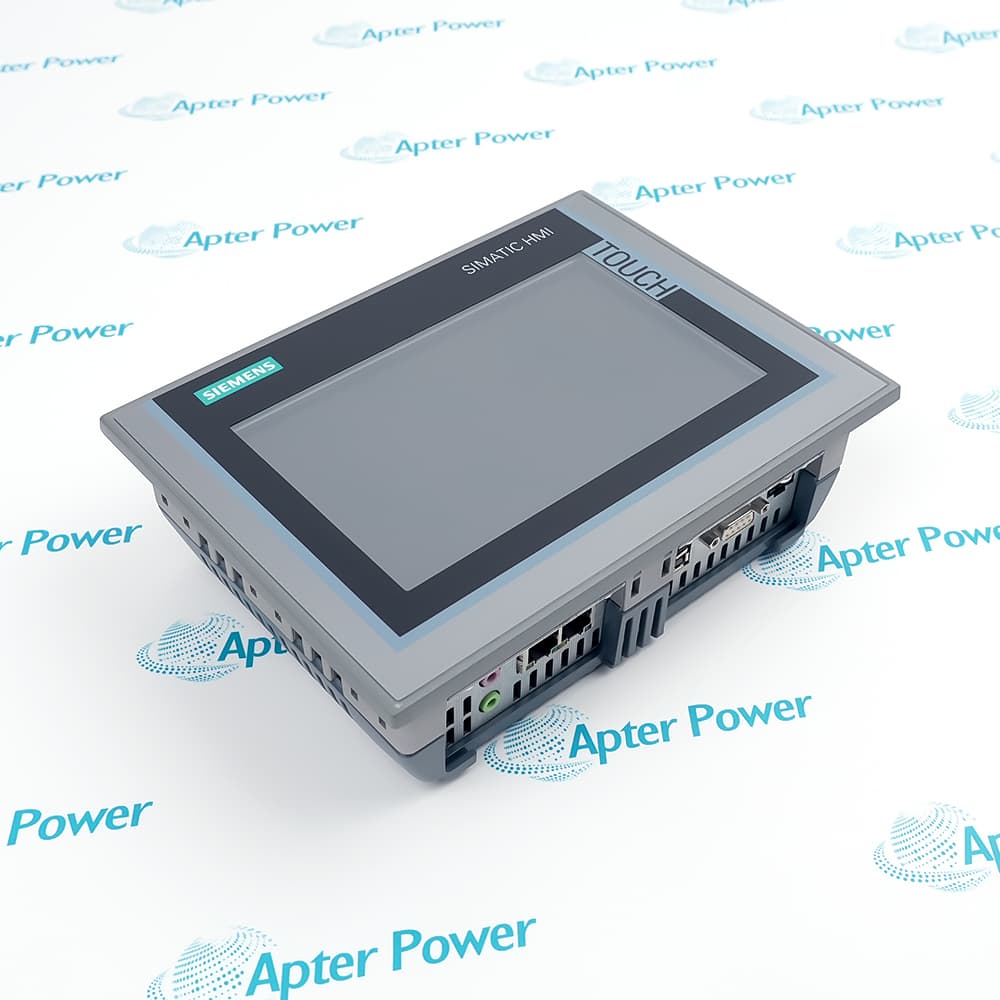
Built for remote HMI display and operation, Siemens 6AV6646-1AB22-0AX0 is a SIMATIC ITC1500 Industrial Thin Client with touch control and Ethernet session protocols.
In Stock
Ships by Wednesday, October 28
Fast Shipping Available
Get a quick price for 6AV6646-1AB22-0AX0
Quantity
*E-mail
Company
*Mobile
*Content
Upload (gif, jpg, jpeg, png, bmp, doc, docx, xls, xlsx, ppt, pdf, csv)

Technical specifications for 6AV6646-1AB22-0AX0

  • Manufacturer:
    Siemens
  • Part Number:
    6AV6646-1AB22-0AX0
  • Product Family:
    Siemens Simatic HMI
  • Product Type:
    SIMATIC ITC1500 Industrial Thin Client
  • Stock:
    1
  • Display Size:
    15.4-inch widescreen
  • Display Technology:
    TFT with LED backlighting
  • Resolution:
    1280 x 800 pixels
  • Display Colors:
    16,777,216
  • Brightness Control:
    Dimmable from 5% to 100%
  • Touch Operation:
    Single-touch
  • Supply Voltage:
    24 V DC; permissible range 19.2-28.8 V
  • Maximum Input Current:
    1.5 A
  • Industrial Ethernet:
    1 interface; up to 1000 Mbit/s
  • Rear USB Interfaces:
    2
  • Remote Session Protocols:
    RDP, VNC and SmartServer
  • Web Technologies:
    HTTP, HTML5, XML, CSS and JavaScript
  • Network Services:
    TCP/IP, DHCP, SNMP, DCP and LLDP
  • Local Applications:
    Web browser and PDF reader
  • Configuration:
    Local or remote through RCC V2.0
  • Runtime Languages:
    German and English
  • Operating Temperature:
    0 to 50 °C
  • Storage Temperature:
    -20 to 60 °C
  • Maximum Relative Humidity:
    90%
  • Front Installation:
    Built-in mounting
  • Weight:
    13.448 lbs (6.1 kg)
  • Estimated shipping dimensions:
    66x51x22cm
  • Tariff Code:
    84719000
  • Country of origin:
    Germany
  • Place of shipment:
    Xiamen,Fujian,China
By purchasing this item, you agree to the Terms & Conditions, ApterPower is not an authorized distributor for listed manufacturers or tradenames and therefore the manufacturer's warranty does not apply. All our products come with ApterPower's 1-year warranty.

More Information

Overview Manuals Remote Sessions Web Client USB Access Panel Setup

Features:

  • Displays remote HMI sessions on a 15.4-inch widescreen single-touch interface.
  • Accepts RDP, VNC, SmartServer, and browser-based visualization through one Industrial Ethernet connection.
  • Combines rear USB peripherals with local or remote RCC client configuration.
The thin-client architecture receives visualization from a remote system instead of storing a PLC control program in the panel.

Network services handle addressing, discovery, and supervision around the selected remote-session protocol.

The mounted front is the operator boundary, while power, Ethernet, and peripheral connectors remain at the rear.

The Siemens 6AV6646-1AB22-0AX0 SIMATIC ITC1500 Industrial Thin Client may still be available for purchase and support from Apter Power beyond End-Of-Life (EOL) by the manufacturer (OEM).
Siemens 6AV6646-1AB22-0AX0 SIMATIC ITC1500 Industrial Thin Client Manuals,Datasheets,Link Important Notice: Other accessories, manuals, cables, calibration data, software, etc. are not included with this equipment unless listed in the above stock item description. All prices are shown in USD.

How visualization reaches the thin client

  • RDP connection: A Remote Desktop session presents the host interface on the touch panel across Ethernet.
  • VNC connection: VNC supplies another supported route for viewing and operating a remote visualization session.
  • SmartServer client: The panel can open a SmartServer session when that service is configured on the host.
  • Session boundary: The thin client provides display and input at the panel while application execution remains on the remote system.

Browser content and network services

  • Browser engine: The local browser renders supported HTTP content based on HTML5, XML, CSS, and JavaScript.
  • Address assignment: DHCP can supply the client network address when the Ethernet segment provides that service.
  • Device discovery: DCP and LLDP identify the panel and its network neighbors for supported engineering and topology functions.
  • Network monitoring: SNMP exposes supported client information to a network-management station.

Local input and removable-device paths

  • Keyboard input: A USB keyboard provides local text and command entry outside the touch surface.
  • Pointer input: A USB mouse can control the remote or browser session through a rear connection.
  • Peripheral location: Both USB ports remain behind the panel after built-in installation.
  • Session relationship: USB input is passed to the active client session instead of operating a local automation program.

Configuration and enclosure boundaries

  • Client settings: RCC V2.0 supports configuration at the panel or from a remote engineering path.
  • Operator side: The display and single-touch surface form the accessible front of the installation.
  • Cabinet side: The Ethernet, USB, and 24 V DC connectors remain within the enclosure behind the mounting cutout.
  • Brightness control: Backlight adjustment changes operator visibility without changing the remote application's display resolution.
Description
Built as a remote visualization endpoint, Siemens 6AV6646-1AB22-0AX0 is a SIMATIC ITC1500 Industrial Thin Client whose 15.4-inch touch display presents HMI content supplied over an Ethernet connection rather than executing a local controller program.

Remote sessions reach 6AV6646-1AB22-0AX0 through its Industrial Ethernet interface using RDP, VNC, SmartServer, or web protocols. TCP/IP, DHCP, SNMP, DCP, and LLDP support network addressing, discovery, and management around those sessions, while the browser handles HTML5, XML, CSS, and JavaScript content.

The widescreen front of 6AV6646-1AB22-0AX0 combines 1280 x 800 visualization with single-touch input and adjustable backlight brightness. Local or remote RCC configuration defines the client behavior without adding a separate display controller to the field panel.

Peripheral access on 6AV6646-1AB22-0AX0 uses two rear USB connections for a keyboard, mouse, or supported USB device. The 24 V DC supply and Ethernet and USB connectors remain behind the mounted panel, while the installed front provides the operator-side enclosure boundary.
Alternative Names
6AV66461AB220AX0 6AV6646 1AB22 0AX0 Siemens 6AV66461AB220AX0 6AV6646-1AB22-0AX0 ITC1500 6AV6646-1AB22-OAXO 6AV6646-IAB22-0AX0 6AV6646-1AB2Z-0AX0 SIMATIC ITC 1500 6AV6646-1AB22-0AX0
Technical notes
Siemens 6AV6646-1AB22-0AX0 receives remote visualization through Ethernet and provides single-touch operation, two rear USB paths, and local or remote RCC configuration.
Exceptional Service

Our Mission

  • 100% Satisfaction

    We believe expertise is priceless. With over 20 years of experience, and top engineers on staff, we can help you solve or avoid problems that threaten your business.
  • Trust Guaranteed

    Not only do we have a vast inventory, our team makes sure every piece of equipment is in working condition. Your purchases are also backed by our Warranty.
  • Expertise

    Time is money, especially when your equipment is down. We work quickly to get your equipment on its way so you can get it back up and running.

FAQS

The following is a list of questions commonly asked by our customers. Please contact us if you have a question about our process that is not answered below.
Which remote-session methods can Siemens 6AV6646-1AB22-0AX0 open?
Siemens 6AV6646-1AB22-0AX0 supports RDP, VNC, SmartServer, and web-based sessions through its Industrial Ethernet interface.
Does 6AV6646-1AB22-0AX0 execute a local PLC program?
No. 6AV6646-1AB22-0AX0 is an Industrial Thin Client that displays and operates remote visualization content rather than acting as a PLC CPU.
How can a keyboard or mouse be connected to 6AV6646-1AB22-0AX0?
Use either of the two rear USB interfaces on 6AV6646-1AB22-0AX0 for the supported keyboard, mouse, or USB peripheral.
What is the difference between local and remote configuration on 6AV6646-1AB22-0AX0?
RCC V2.0 lets 6AV6646-1AB22-0AX0 client settings be changed at the panel or through a remote configuration path.
Can 6AV6646-1AB22-0AX0 display browser-based HMI content?
Yes. The browser in 6AV6646-1AB22-0AX0 supports HTTP content using HTML5, XML, CSS, and JavaScript.
Which connectors remain behind the cabinet front on 6AV6646-1AB22-0AX0?
The 24 V DC supply, Industrial Ethernet port, and two USB interfaces of 6AV6646-1AB22-0AX0 remain on the rear side of the built-in panel.